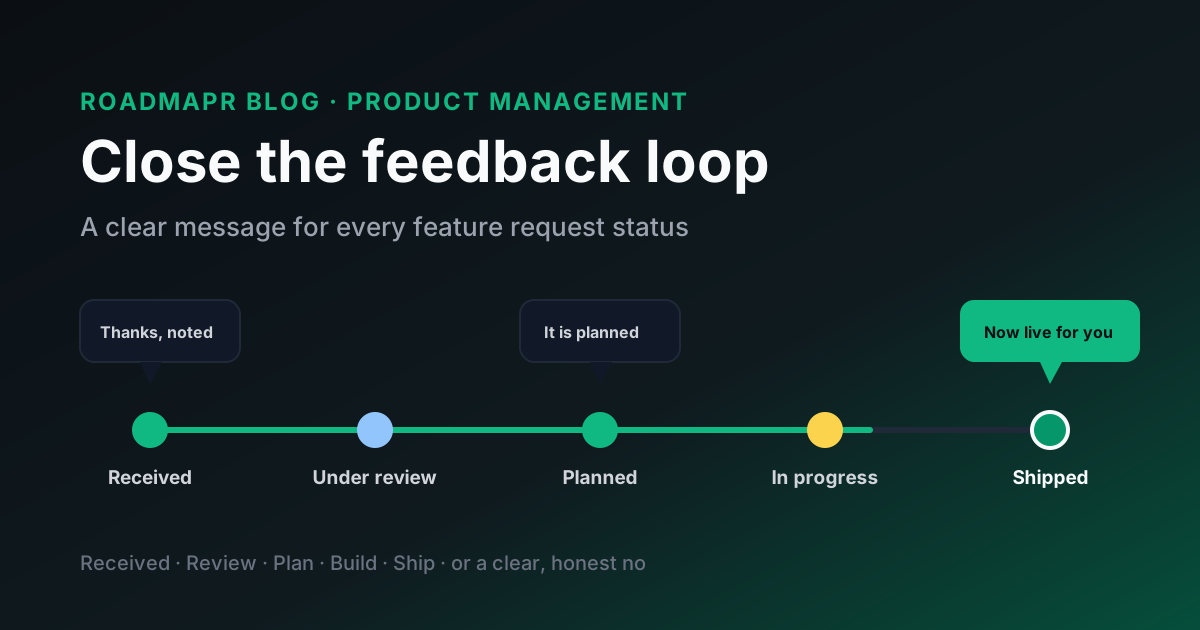
Most SaaS teams are good at collecting feedback and bad at answering it. A customer submits an idea, a few people vote on it, and then nothing visible happens for months. The customer has no way of knowing whether it was discussed or half built, so they assume it was ignored.
Closing the feedback loop means telling people what happened to the thing they asked for. It sounds simple, and the first message usually is. The hard part is the middle of the story: the request that sat in review for six weeks, the feature that slipped, the version that shipped differently from what the customer described.
Below is a message for every stage, including the awkward ones, plus a short weekly routine that keeps the loop closed.
Quick Answer
To close the feedback loop on feature requests, reply to every request when it arrives, send a short update each time its status changes, and tell everyone who asked when it ships or when you decide not to build it. Keep a list of who asked on the request itself, so the right people hear the news. Explain the reason behind each decision in one or two sentences, never promise dates you cannot control, and check once a week for requests that have gone quiet.
Why the Loop Breaks
Feedback loops rarely break because a team does not care. They break for practical reasons:
Nobody owns the reply. Support thinks product will update the customer. Product thinks support will. The customer hears from neither.
The list of who asked is lost. The request was copied from a support chat into a planning document, and the name of the customer did not come with it. When the feature ships, the team cannot tell who was waiting for it.
Only the good news gets sent. Teams are happy to announce a shipped feature. They are much less comfortable saying "this is delayed" or "we decided against it", so those updates never go out. Silence feels safer, but customers read it as neglect.
Updates happen in bursts. Someone cleans up the board once a quarter, changes forty statuses in an afternoon, and then nothing moves for another three months.
Each of these is fixed by writing short messages at predictable moments.
The Messages, Stage by Stage
The examples below are starting points. Rewrite them in your own voice, and keep them short. A good update is two to four sentences: what changed, why, and what happens next.
1. Received
Send this within a day or two of the request arriving. Its job is to confirm a human read it and to set expectations.
Example: "Thanks for the suggestion. I have added it to our feature board so other customers can vote on it, and our product team reviews new requests every week. You will hear from us when its status changes."
It is also a good moment to ask one question about the problem behind the request, such as "What are you trying to do when you hit this?"
2. Under review
This status tells people the request is being considered, not that it is coming. Say so plainly.
Example: "We are looking at this one more closely. That does not mean it is scheduled yet, but we are checking how many customers it affects and how it fits with what we are already building."
Under review is the stage where requests tend to stall. If something has been in review for longer than your normal planning cycle, either decide or send a note saying it is still open and why.
3. Planned
Planned is the update customers care about most, and the one most likely to create a broken promise. Commit to the decision, not a date.
Example: "Good news: this is now planned. It is on our roadmap, but we do not have a release date to share yet. We will update this request when work starts."
If your public roadmap uses broad horizons rather than dates, point people to it. A now, next, later roadmap is a useful way to show order without making delivery promises.
4. In progress
A short note when work begins shows the request is moving and gives you a chance to recruit help.
Example: "We have started building this. If you would be open to trying an early version or answering a couple of questions about how you would use it, reply here and we will reach out."
Customers who asked for a feature are often the best people to test it.
5. Shipped
Everyone remembers this message, but it is often too vague. Say what shipped, where to find it, and how it relates to the request.
Example: "This is now live. You can find it under Settings, then Exports. You asked for a way to get report data into a spreadsheet, and it now supports CSV downloads for every report. Let us know if it covers what you needed."
Send it to everyone on the requester list, not only the person who first submitted it. Then add it to your changelog so new customers see it too. Our post on using your changelog as marketing covers how to write that entry.
6. Not planned
Declining a request is still closing the loop. A clear no, with a reason, is more respectful than leaving an item open forever.
Example: "We have decided not to build this for now. Most of our customers use a separate tool for this job, and building our own version would slow down work on core reporting. If that changes, we will reopen this request."
If this message is hard to write, our guide on how to say no to feature requests has templates for different situations, including workarounds and partner tools.
The Awkward Updates Most Teams Skip
The six stages above cover the happy path. Real roadmaps are messier, and these are the moments when a short update earns the most trust.
When a planned feature slips
If something you marked as planned is pushed back, say so before customers notice.
Example: "A quick update: we have moved this behind a security project that needed to come first. It is still planned, and we will update you when work begins."
You do not need to share internal detail, but do not let a "Planned" label sit untouched for half a year.
When it ships differently than requested
Often the team solves the underlying problem in a different way from what the customer described. Explain the connection, or the customer may not realise their request was answered.
Example: "We did not add the exact button you described, but the problem you raised, finding old invoices quickly, is now solved by the new search on the billing page."
When you change your mind
Sometimes a planned item is cancelled. Treat it like a "not planned" message, with one extra sentence acknowledging the reversal.
Example: "Earlier we marked this as planned. After building a prototype, we found it created more problems than it solved for most accounts, so we have stopped work on it. We are sorry for the change of direction."
When the requester has left
If a customer cancelled while waiting for a feature that has now shipped, it is reasonable to tell them once, if their communication preferences allow it. Keep it factual. Some will come back.
Who Should Send the Updates
Pick one owner for the loop, often the product manager or a founder. In teams with a support function, support can send the messages while product owns the decision and the reason.
What matters is that the owner has two things:
A 20-Minute Weekly Routine
Closing the loop works best as a habit, not a project. Once a week, ideally right after your triage meeting:
1. Reply to new requests. Everything that arrived since last week gets a "received" note.
2. Send status-change updates. Filter for items whose status changed in the past seven days and message their requesters.
3. Find the quiet items. Look for anything that has not changed status or had a public note in your normal planning cycle. Decide, or post a brief "still open" update.
4. Check shipped items. Make sure everything shipped this week has a changelog entry and a message to its requester list.
If the list of quiet items keeps growing, the fix is usually fewer open requests and more decisions, not more messages.
The public roadmap status hygiene checklist is a good companion for step 3. It helps you spot stale statuses before customers do.
How RoadmapR Helps
RoadmapR gives each team a public board where customers can submit feature requests and vote on them, with items grouped under Under Review, Planned, In Progress and Completed. Because the status is visible to everyone, moving an item is itself a public update, and your written messages can link back to it. You can embed the board in your product so customers find it without leaving their work. See how RoadmapR feature voting works, or compare the plans.
The short, honest messages that close the loop still come from your team.
FAQ
What does it mean to close the feedback loop?
Closing the feedback loop means going back to the people who gave you feedback and telling them what happened as a result: that you received it, that you are building it, that it shipped, or that you decided not to build it and why.
How often should we update customers about feature requests?
Send an update whenever the status of a request changes, and check weekly for requests that have gone quiet. Customers do not need constant messages, but they should never wait months without hearing anything.
Should we tell customers when we will not build a feature?
Yes. A clear decision with a short reason is more useful than an open request that never moves, and it lets customers plan around it.
Who should own closing the feedback loop?
One named person should own it. Product usually makes the decision and writes the reason, and either product or support sends the message. Shared ownership with no named owner is the most common reason updates never go out.
Ready to build your public roadmap?
Roadmapr gives you a public roadmap, feature voting, and a changelog in one place. Start on the Free plan and upgrade when your team grows.
Get Started Free