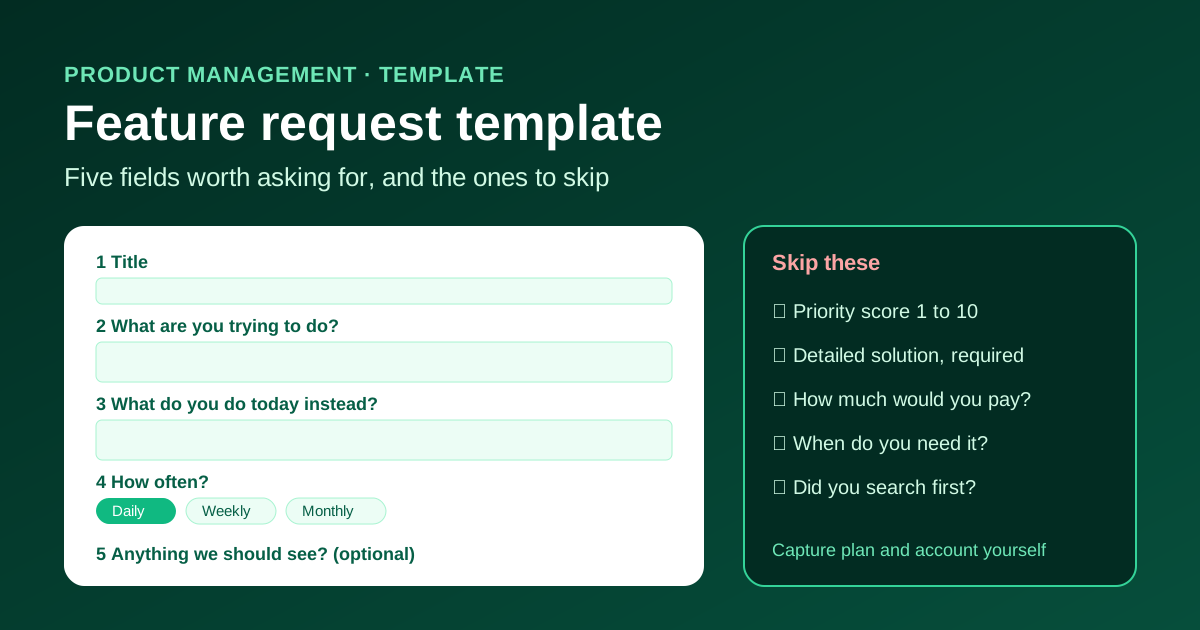
Most feature request forms fail in one of two ways. Either they ask for a title and nothing else, so the product team receives "Export" with no idea what the customer is trying to do. Or they ask fourteen questions, and customers give up halfway through.
A good template sits in between. It captures the problem behind the request, enough context to judge how much it matters, and nothing a customer cannot answer in a couple of minutes. Below is the template we recommend, field by field, with the reasoning behind each one, the fields worth leaving out, and a filled-in example.
Quick Answer
A useful feature request template asks for five things: a short title, the problem the customer is trying to solve, what they do today instead, how often it affects them, and an optional screenshot or example. Capture who asked (account, plan, role) and where the request came from automatically rather than asking for it. Skip fields that ask customers to design the solution, score priority from 1 to 10, or set a deadline. Votes, account data and a follow-up question will tell you more than any of those.
The Template
Copy this into your request form, support macro or internal document, and adjust the wording to your product.
1. Title (required). One line that describes the outcome the customer wants. "Send invoices automatically at month end" is far more useful than "Add a scheduler".
2. What are you trying to do? (required). The job behind the request. Prompt: "Tell us what you were trying to get done when you noticed this was missing."
3. What do you do today instead? (required). The workaround. Prompt: "How do you handle this right now, even if it is clumsy?"
4. How often does this come up? (optional). A simple choice: daily, weekly, monthly, rarely.
5. Anything we should see? (optional). A screenshot, a sample file or a link to an example.
Captured automatically, not asked: the account or company, plan, the person's role if you already know it, the date, and the source (support ticket, sales call, public board, in-app widget).
That is it. Three required fields, two optional ones, and the rest comes from your own systems.
Why Each Field Earns Its Place
The title is for the next reader
The person who reads a request is rarely the person who wrote it. Six weeks later, someone scanning a list of eighty requests needs to understand each one from its title alone. Titles phrased as outcomes ("Let managers approve leave from mobile") make duplicates easier to spot and make the list easier to discuss in planning.
If customers write poor titles, do not reject the request. Edit the title yourself and keep their original wording in the description.
The problem field matters most
Customers are experts in their problem and usually guess at the solution. "Add a CSV export" might mean "I need to send numbers to my accountant every month", which could be solved by an export, a scheduled report or an accounting integration. If you only record the proposed solution, you lose the information that would let you pick the best one.
This is also the field that lets you group requests. Ten customers asking for ten different buttons may all be describing the same underlying problem.
The workaround shows the cost
What customers do today tells you how painful the gap really is. "I copy the numbers into a spreadsheet once a quarter" is a minor annoyance. "Two people spend every Friday afternoon rekeying orders" is a strong signal. It also tells you whether a partial solution would already help, which is useful when you are deciding how much to build.
Frequency beats priority scores
Asking "How important is this from 1 to 10?" produces a column of nines and tens. Asking how often the problem comes up gives you something you can compare across requests. Combine it with the number of people asking and the accounts involved, and you have most of what a prioritization matrix needs.
Context you should capture, not ask for
Customers should not have to tell you their plan, company size or account ID. You already know. Pull it from your system when the request arrives, or have the support agent fill it in. Every question you remove from the form makes it more likely the customer finishes it.
Fields to Leave Out
One Template, Every Channel
Requests do not only arrive through a form. They come from support chats, sales calls, emails, reviews and team members who heard something from a customer. Use the same fields everywhere.
For requests your team logs on a customer's behalf, add three internal fields:
The "requested by" list is what makes it possible to close the feedback loop when the status changes. Without it, nobody knows who was waiting.
A Filled-In Example
Title: Send invoices automatically at month end
What are you trying to do? We bill about forty retainer clients on the last working day of each month. I want the invoices to go out without someone remembering to press send.
What do you do today instead? Our office manager sets a reminder and sends them one by one. When she is on leave, invoices go out late and we get paid late.
How often? Monthly.
Anything we should see? Screenshot of the current invoice list.
Captured automatically: Account Northwind Studio, Pro plan, billing admin, logged from a support ticket on 3 October.
From this, a product team can see the real need (reliable scheduled sending), the cost (late payments, one person's time), and who to tell when it ships.
What Happens After a Request Arrives
A template only helps if requests move somewhere. Acknowledge each one, merge duplicates into a single request with a combined "requested by" list, review new requests on a regular schedule, and give every request a visible status. Our feature request management process covers that routine step by step, and how to say no to feature requests has reply templates for the requests you decide not to build.
How This Looks in RoadmapR
RoadmapR keeps its public request form deliberately short: a title, a description and an optional category, such as UI/UX, Performance or API. The prompts from this template work well as guidance text above your board or in your support macros, so customers know what to put in the description. Customers can vote on requests that already exist, which keeps duplicates down and shows you demand at a glance, and each request moves through Under Review, Planned, In Progress and Completed so everyone can see what happened to it. You can learn more on the feature voting software page.
FAQ
Should feature requests be public or private?
Both work. A public board lets customers see and vote on each other's ideas, which reduces duplicates and shows demand. Private intake suits products where requests contain sensitive business details. Many teams accept requests privately through support and publish a cleaned-up version on a public board.
How long should a feature request form be?
Short enough to finish in two or three minutes. Three required fields is a good ceiling for a public form. Anything else should be optional or captured automatically.
Should we let customers submit requests anonymously?
It lowers the barrier, but you lose the ability to ask follow-up questions or tell them when the feature ships. If you allow it, ask for an optional email address so people can choose to hear back.
What is the difference between a feature request and a bug report?
A bug report says something does not work as intended. A feature request asks for something the product does not do yet. Keep them in separate queues with separate templates, because bugs usually need steps to reproduce, and feature requests need the problem and the workaround.
Ready to build your public roadmap?
Roadmapr gives you a public roadmap, feature voting, and a changelog in one place. Start on the Free plan and upgrade when your team grows.
Get Started Free